Claude Skills: How to teach an AI the way your company works
A Claude Skill is a folder with a file called SKILL.md: instructions for how a task is done in your company, plus templates, reference files and scripts where needed. Claude only loads the skill when a task calls for it. You write down once how your company builds a quote or checks an inspection report, instead of explaining it again in every chat. The real work comes afterwards: deciding who approves skills, who maintains them and who is accountable for them.
What is a Claude Skill?
Anthropic describes skills as folders of instructions, scripts and resources that Claude loads dynamically, and compares them to an onboarding guide for a new hire. The comparison fits. A skill does not explain what a quote is. It explains how your company writes quotes, which details are mandatory and when sales has to sign off.
Technically, there is not much to it. SKILL.md starts with a header holding a name and a description, followed by plain Markdown. Subfolders can sit next to it with templates or small check scripts. What matters is when Claude reads which part. According to Anthropic's documentation, this happens in three levels:
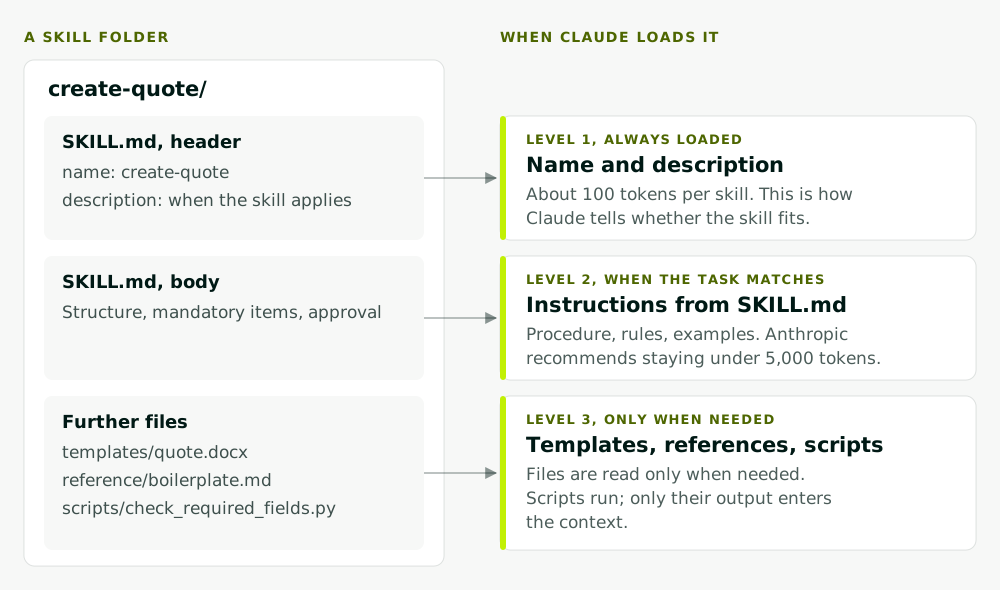
- Name and description are always loaded, about 100 tokens per skill. Claude uses them to decide whether a skill fits the task.
- The body of SKILL.md is read only when a task matches. Anthropic recommends keeping it under 5,000 tokens.
- Further files are read only when needed. Scripts are executed, and only their output enters the context.
In practice, twenty skills cost almost nothing until they are used. It also means a description like "Helps with quotes" is not enough. Claude picks the skill on the strength of that one sentence.
Where skills run
Skills are available in the Claude app on every plan, provided code execution is switched on, in Claude Code and through the API (Claude Help Center). In December 2025 Anthropic published the format as an open standard. The specification on agentskills.io is short: one folder, one SKILL.md with the required fields name and description, optionally scripts/, references/ and assets/. For a company, this is the key point: your know-how sits in a folder as readable text and is not locked into a single product.
Skill, prompt, instructions, MCP or plugin: what is what?
The terms get mixed up a lot. The differences become clear once you ask when something is loaded and what it gives Claude.
| Building block | What it is | When it applies | Typical use |
|---|---|---|---|
| Prompt | an instruction in the chat | this conversation only | one-off task |
| Custom instructions, CLAUDE.md | fixed rules and facts | every conversation | tone, ground rules |
| Skill | folder with procedure, templates, scripts | when the task matches | recurring procedure |
| MCP server | interface to a system | tools are on hand | read the ERP, open a ticket |
| Plugin | package of skills, hooks, MCP servers | while installed | roll out to a team |
The Claude Code documentation offers a good rule of thumb: create a skill when you keep pasting the same instructions, checklists or multi-step procedures into the chat, or when a section of your standing instructions has turned from a fact into a procedure. "We address customers formally" belongs in the standing instructions. "This is how we review an 8D report" is a skill.
The most common misunderstanding concerns MCP. A skill knows how to structure a quote, but it does not know your prices. Those live in the ERP, and Claude needs access to them, for example through an MCP server. Skills and MCP complement each other: the skill describes the procedure, MCP provides the tools. We explain how MCP works in MCP explained. Plugins, in turn, are just the packaging used to hand skills, MCP servers and other parts to a team together; more on that in our post on Claude Code mods.
Three examples from everyday business
The following skills are examples of how we would set them up with a department. They show what belongs in a skill and what does not.
Quote template
A create-quote skill holds the structure of your quote, mandatory items such as validity, delivery terms and payment terms, your boilerplate for standard items and the rule for which discount level needs sales approval. The folder contains the Word template and a small script that checks whether all mandatory fields are filled. What does not belong in it: prices and customer terms. They change and belong in the ERP. If you want quotes prepared automatically from incoming requests, you need an agent with access to the item master and customer terms, as in our use case Turn price requests into quotes.
Quality checklist
A review-8d-report skill holds your checklist for complaint reports: is the problem described, is there a containment action, is the root cause backed by evidence, is there an effectiveness check with a date and an owner? Claude returns a table marked "met", "missing" or "unclear", each with the relevant passage in the report. The judgement stays with quality management. The gain is that every review asks the same questions, whoever starts it.
Style guide
A writing-rules skill records how your company writes: formal address, product names spelled correctly, terms you use and terms you avoid, rules for emails and slides. Anthropic itself names brand guidelines as a typical use case. This is how such a skill begins:
---
name: writing-rules
description: Company writing rules for customer emails, quotes and slides. Use whenever a text goes to a customer.
---

# Writing rules

- Address customers formally, keep sentences short, avoid jargon where a plain word exists.
- Spell product names exactly as listed in reference/product-names.md.
- Never commit to delivery dates; refer the customer to the sales office instead.
That is all there is to it. Anyone who can write a good work instruction can write a skill.
Who writes, reviews and versions skills?
A skill is written quickly. It becomes a risk when nobody knows which version is the valid one. We recommend three roles per skill:
| Role | Responsibility |
|---|---|
| Subject-matter owner | writes the content, keeps it current, tests it on real cases |
| AI or IT lead | reviews scripts, network access and data protection before release |
| Approver | decides whether a skill is rolled out to everyone |
A few rules follow from how skills work:
- One place for the valid version. Skills are files. Keep them in a repository, or at least in a central folder with change history.
- Raise versions deliberately. In Claude Code, skills are best distributed as a plugin. If the plugin sets a version, users only receive updates when you raise the version number (Claude Code documentation).
- Know when a change reaches everyone. On Team and Enterprise plans of the Claude app, owners can provision skills for the whole organisation. Shared skills are read-only, and recipients get updates automatically (Claude Help Center). A correction therefore applies to everyone at once. Review before every change.
- Test on real cases. Anthropic recommends starting with an evaluation on representative tasks. In practice: five to ten real cases with a known result, rerun after every change.
Risks: skills can run code
A skill is not just text. It can bring scripts, and Claude executes them. Anthropic therefore warns explicitly that malicious skills may introduce vulnerabilities or direct Claude to exfiltrate data, and recommends installing skills only from trusted sources.
How large the risk is depends on where the skill runs. Through the API, skills run in a sandboxed container with no network access. In Claude Code on an employee's machine, on the other hand, whatever a plugin runs, it runs as the user. A script from a third-party skill can read whatever that user can read.
There is a second, quieter risk: instructions hidden in reference files. A skill can tell Claude to send content to an external address without any script being involved.
And the other way round: never put credentials, personal data or confidential terms into skills. A shared skill can be read by everyone it is shared with.
How to start
Find a task where colleagues keep pasting the same instructions into the chat. Write it down together with the person who does it best. Test the skill on a handful of real cases, name an owner, then release it. After three or four skills like this, you will know which rules your company needs for skills.
We use skills in our own development work every day and help teams write down their procedures so that AI tools follow them reliably, with rules, training and approval. More under AI training & governance. If a skill should grow into an agent that works in your systems itself, continue with AI agents.