MCP explained: how AI assistants reach your systems and what that means for your IT
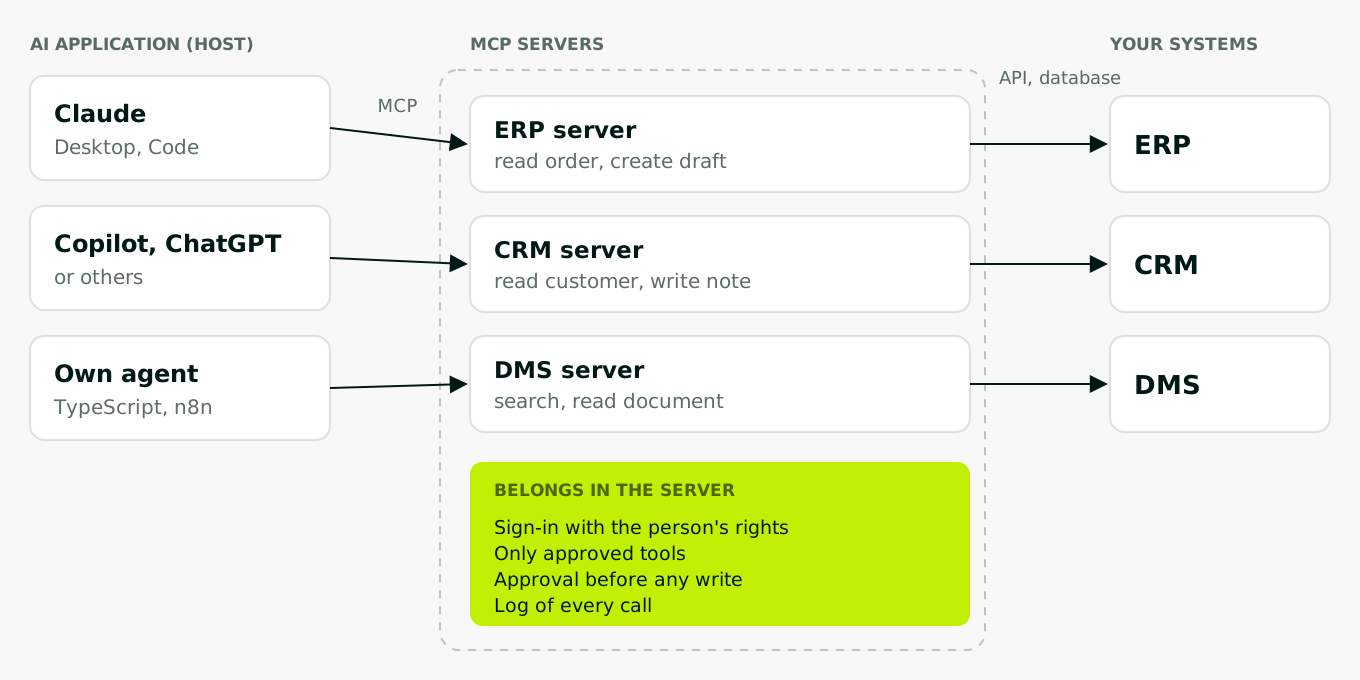
The Model Context Protocol, MCP for short, is an open standard that lets AI applications such as Claude, ChatGPT, Copilot or your own agent access your systems. An MCP server exposes a system's functions, for example "read order" in the ERP, as tools, and any compatible AI application can use them. For your IT, the question shifts: away from "which AI?" and towards "which tools does the server expose, with which permissions, who approves writes, and what gets logged?".
What MCP is
Anthropic released MCP as an open standard in November 2024. The specification describes it as an open protocol that connects AI applications with external data sources and tools. Since 9 December 2025, MCP has been part of the Agentic AI Foundation under the Linux Foundation. Its members include Anthropic, OpenAI, Google, Microsoft and AWS. The standard no longer belongs to a single vendor.
Support is now broad: OpenAI in its Responses API, Microsoft in Copilot Studio, Google with its own MCP servers for cloud services, and of course Claude, as a connector or in Claude Code. The current version of the specification is dated 28 July 2026.
A comparison that holds: the printer driver
There was a time when every program had to know every printer itself. Then printer makers started shipping a driver, and every program could print. MCP does the same for AI and business systems. Without MCP, every AI application needs its own connection to every system. With three AI applications and three systems, that is nine. With MCP you build one server per system, and every AI application uses it.
The comparison has one important limit. A printer driver does exactly what the program tells it to. With MCP, the language model decides by itself which tool to call and when. That is why the server has to define what is possible at all, not the AI.
How an MCP server works
The specification distinguishes three roles:
- Host: the AI application someone works in, such as Claude, Copilot or your own agent.
- Client: the part inside the host that holds the connection to a server.
- Server: the program that exposes a system, such as your ERP.
A server offers three kinds of content. Tools are functions the model can call, such as "find order" or "add note". Resources are data to read, such as a document. Prompts are prepared templates for recurring tasks.
The connection runs either locally on the machine (stdio) or over the network (Streamable HTTP). For business systems, the networked server is the normal case: it runs centrally, sign-in uses OAuth 2.1, and your IT can operate and monitor it like any other application.
What this means for your IT
Permissions: the person's, not a shared account
The most common mistake is an MCP server that reaches into the ERP with a technical account with full access. Then everyone sees, through the AI, everything that account can see. The right way: the server signs the person in through your directory, such as Entra ID, and works with their permissions. The authorization specification builds on OAuth 2.1 for this and explicitly forbids a server from accepting or passing on tokens that were not issued for it.
Part of this is cutting tools narrowly. "Read order" and "create draft" rather than "run SQL". Any tool a server offers, the model can call.
Approvals: a person before every write
On tools, the specification says there should always be a human in the loop who can deny calls. Many AI applications therefore ask before a call. Do not rely on that alone, because users click through prompts quickly. It is better to put the approval in the server itself: reads go straight through, writes create a draft, and anything leaving the company is sent by a person.
Logging: every call, with person and result
Every tool call belongs in the log: who, when, which tool, with which parameters, with which result. For writes, add the old and new value. The log belongs in the server, because that is the one place every AI application passes through.
Security: three risks you should know
Smuggled instructions. A language model does not reliably distinguish between your instructions and text in the data it reads. A crafted email or ticket can get it to leak data through another tool. OWASP ranks this as the number one risk for language model applications (LLM01 Prompt Injection). A well-known example: in May 2025, researchers at Invariant Labs showed how a crafted public issue got an agent using the GitHub MCP server to publish content from private repositories.
Manipulated tool descriptions. The model reads every tool's description. A malicious server can hide instructions in it that the user never sees. Invariant Labs described these "tool poisoning" attacks in April 2025. The OWASP MCP Top 10 lists them as a risk of their own.
Servers from untrusted sources. In September 2025, the npm package "postmark-mcp" was found to send a blind copy of every email it sent to an outside address from a certain version on (Postmark, Snyk). The package did not come from the vendor. An MCP server is software with access to your data and needs the same review as any other.
MCP or a fixed integration?
MCP is not the right choice for every connection. It pays off where a language model decides case by case which step it needs. Where the process is always the same, a fixed integration is simpler, cheaper and easier to audit.
| Question | Rather an MCP server | Rather a fixed integration |
|---|---|---|
| What starts the process? | A person talking to the AI | An event, such as a new invoice |
| Is the path always the same? | No, it differs per case | Yes, always the same steps |
| How many AI applications use the system? | Several | One or none |
| What is the volume? | Individual requests | Thousands of similar transactions |
| How strictly must it be traceable? | A log is enough | Every step fixed by rules |
An example: if the sales office asks in Claude or Copilot "What's the status of order 40117, and has the customer complained before?", an MCP server for ERP and CRM fits. If every inbound invoice is to be read, checked against the purchase order and posted, that is a fixed pipeline with rules. It needs no model choosing tools by itself.
Also keep in mind: MCP is young. The specification has changed several times since 2024, most recently in July 2026 with the move to stateless connections. If you build a server, expect to adapt it.
Building an MCP server: what it takes
Technically, an MCP server is quick to build. There are official SDKs for TypeScript, Python and other languages, and a first server with two tools is a matter of hours. The real work lies elsewhere:
- Cutting the tools: which functions does the use case really need, and how do you name them so the model picks the right one?
- Sign-in and permissions: OAuth against your directory, the person's permissions all the way into the target system.
- Approval and logging: in the server, not in the hope that the AI application handles it.
- Testing with real questions: does the model pick the right tool for 50 typical requests, and what happens with crafted data?
- Operations: the server runs like any other application, with monitoring, updates and an owner.
For many common systems, vendors already ship their own servers. Check first whether an official one exists, then whether it meets your requirements on permissions and logging.
How we use MCP
We build MCP servers in TypeScript, one per system, hosted in Germany. Sign-in goes through the client's directory, and every server works with the signed-in person's permissions. We start with read-only tools. Write tools are added step by step, usually as a draft that a person approves. Every call is logged. The same servers are then used by Claude, Copilot or our own agents running models from EU endpoints.
MCP governs what an AI can access. How it approaches a task is a separate matter, covered in our post on Claude Skills.
If you want to know which of your systems suit MCP and which are better connected with a fixed integration, our approach is described under AI integration. Where an agent should decide case by case, see AI agents.