Claude Code mods: what the new feature brings and why AI tools are becoming customisable
This is not about Minecraft mods. It is about a new feature in Claude Code, Anthropic's AI tool for software development. Since early October 2026, Claude Code can be extended with mods: small programs in JavaScript or TypeScript that run inside Claude Code, draw their own panes into the interface, add commands and step into every tool call. For companies, the message is bigger than the feature: AI tools are adapting to the way a team works, and that calls for rules on who may install what.
What is new?
According to the documentation, mods are on by default from Claude Code v2.1.287 in the terminal and v2.1.286 in the desktop app. The Decoder reported the release on 3 October 2026. Some of Claude Code's own features, such as the /diff command, are already built as mods.
A mod consists of functions that Claude Code calls on certain events: when Claude is about to use a tool, when a prompt is submitted, or when part of the interface is drawn. The function can observe the event, rewrite it or answer it itself. According to Anthropic, that lets a mod:
- draw an interactive interface, such as a pane next to the transcript with tabs and buttons
- restyle parts of the existing interface
- hold a tool call, answer it without running the tool, or send a request to a different model
- add its own
/commandsthat run at once, without waiting for Claude to respond
Anthropic publishes example mods. One of them, blast-radius, stops risky commands such as deleting whole directories or a force push, shows what they would change and asks before continuing. Another draws a forecast of how full the context window is above the prompt.
The layers: mods, plugins, skills, hooks and MCP
Mods are not the first way to customise Claude Code. They are the deepest. The overview shows what each layer changes and where it runs.
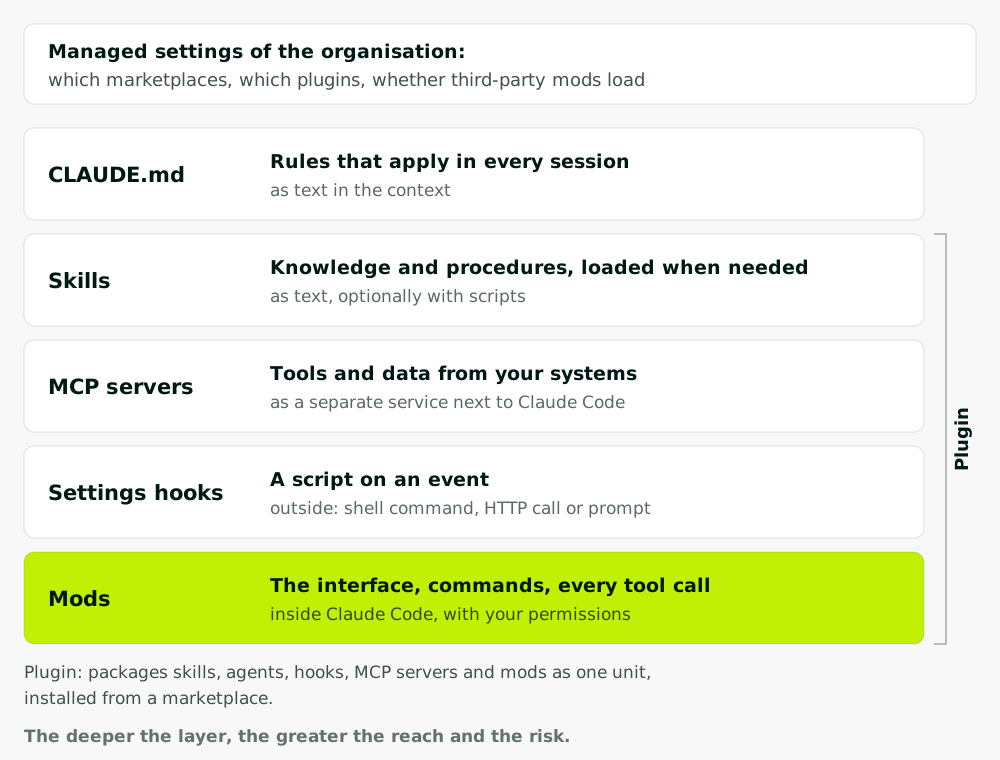
| Building block | What it changes | Where it runs | Example |
|---|---|---|---|
| CLAUDE.md | rules for every session | as text in the context | "Run the tests before every commit" |
| Skill | knowledge and procedures, on demand | as text, optionally with scripts | quote template |
| MCP server | tools and data | as a separate service | read tickets |
| Settings hook | a script on an event | outside Claude Code | formatter after every edit |
| Mod | interface, commands, tool calls | inside Claude Code | confirmation before a risky command |
A plugin is not a layer of its own but the packaging. According to the plugins overview, it bundles skills, agents, hooks, MCP servers and, indeed, a mod into one unit that you install from a marketplace. A marketplace is simply a catalogue, a repository or directory with a list of plugins. A plugin that contains a hooks module is called a mod.
The difference between a hook and a mod matters most. The existing hooks, now called settings hooks in the documentation, start a shell command, an HTTP request or a prompt from outside. A mod runs inside the program and shares its state across all events. Anthropic itself advises: if a settings hook, a skill or an MCP server already does what you need, compare them before writing a mod. We explain what a skill is in Claude Skills and what an MCP server does in MCP explained.
What a company can learn from it
Most readers of this blog will never write a mod. The idea behind it still matters to every company introducing AI tools: the tool adapts to the team, not the team to the tool. Four lessons carry straight over to your own AI applications.
Keep the layers apart. In Claude Code, knowledge, access, rules and interface are separate building blocks. Your own agent should work the same way. Domain knowledge lives in documents the department maintains. Access to ERP and CRM lives in interfaces with their own permissions. The rules on what may happen without approval live in code. Then purchasing can change a check rule without anyone touching the integration.
Rules as code, not as a request. The example mod blast-radius does not rely on the model being careful. It intercepts the risky command before it runs. The same principle applies to agents in day-to-day operations: "never send without approval" does not belong in the prompt but in the software, as a hard limit. That is how we build AI agents: anything binding that leaves the company or moves money is approved by a person.
Smallest layer first. Anthropic recommends checking first whether a skill or hook is enough. Translated to your projects: a rule before a model, a template before an agent. The deepest solution is the most powerful and the most expensive to run.
Where people already work. Mods draw their controls into the interface developers already have open. For business teams, that means the agent's draft appears in the ERP or the inbox, not in an extra chat window someone has to copy data into.
Installing third-party mods: governance
The documentation is clear about the risks. Once loaded, a mod can:
- read and write files wherever the user account can, start programs and make network requests
- read environment variables and settings files, including any API keys stored there
- see and rewrite every prompt and every tool call
- approve a tool call before the user is asked
- call models on the user's plan or API key
Mods are not sandboxed. If Claude Code's sandbox is switched on, it isolates the commands Claude runs, but not the processes a mod starts.
For organisations, Anthropic describes the controls on Manage mods for your organization. The most important ones:
- Allow only your own mods. The
allowManagedModsOnlyoption in managed settings stops mods that users install themselves, load with--plugin-diror have Claude write for them. Users cannot undo it. - Limit marketplaces. Because a mod is a plugin, the plugin rules apply, such as a list of allowed marketplaces.
- Deny rules still win. Where the guard loads, a third-party mod cannot approve a call that a
denyrule refuses. But this covers Claude's tool calls. If a mod reads a file with its own functions, the rule does not apply. - Check before installing.
claude plugin validatelists, without running the mod, which events it handles and what it requests from Claude Code, such as file access or network requests.
From this, our proposal for a one-page policy:
| Question | Recommendation |
|---|---|
| Who may load mods? | a pilot group at first, allowManagedModsOnly for everyone else |
| Where do they come from? | an internal marketplace of reviewed plugins |
| Who reviews? | a named person reads the code and the output of claude plugin validate |
| Which version applies? | a fixed version number, updates only after another review |
| What sits on the machines? | no long-lived keys with broad permissions |
It is the same question every AI tool with extensions raises, whether agents in Microsoft 365, automations in n8n or skills in the Claude app: who may allow which extension to do what, and who checked it?
Do you need this?
If your developers use Claude Code: yes, at least the governance part. Set the managed settings before the first colleague installs an interesting mod from the internet. If your company does not use Claude Code, take the lesson with you: good AI tools can be adapted to the way you work, in layers, with clear limits.
We help teams write rules for AI tools, train their people and document it all, see AI training & governance. And if you need your own tool that works in your systems, AI agents is the next step.