Why the AI cannot find your part number: pgvector, Azure AI Search and others compared in plain terms
A vector database searches by meaning, not by characters. To it, "4711-B02" and "4711-B03" sit in almost the same place, so the wrong part number ends up on top. A knowledge system therefore needs several searches at once: by meaning, by exact wording and by word stem. Which product delivers that search matters less. What decides is where the data lives, how read permissions are enforced and who runs it.
Three ways to search
When a knowledge system "searches", that can mean three different things, and each finds something else.
| Search type | How it works | Good at | Poor at |
|---|---|---|---|
| By meaning | Text becomes a row of numbers; similar meaning sits close together | Paraphrases, other languages | Numbers, names, dates |
| By wording | Compares characters and words | "4711-B02", "EN 1092-1" | Synonyms, paraphrases |
| By word stem | Reduces words to their base form | "seals" finds "seal" | Compound terms without a dictionary |
Searching by meaning is also called semantic search or vector search. A vector database stores exactly these rows of numbers and returns the ones closest to a question. That helps a lot when staff phrase things differently from the manual. Microsoft's own documentation for Azure AI Search says that product codes, specialised jargon, dates and people's names do better with keyword search, because it finds exact matches (Microsoft Learn, Hybrid search).
Stemming matters even more in German than in English, where long compound words are common. PostgreSQL ships dictionaries for German, English and many other languages (PostgreSQL documentation).
Why the part number disappears
An example from wholesale. Someone in inside sales asks: "What is the lead time for 4711-B02?" The repository holds data sheets for 4711-B02, 4711-B03 and 4711-B20, plus a general page about lead times.
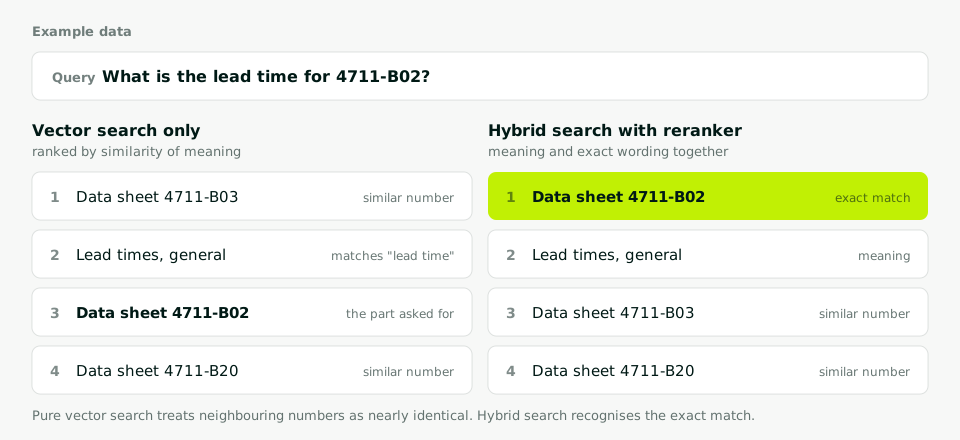
Pure vector search returns similar documents. To vector search, neighbouring numbers look almost identical, and the words "lead time" match the general page best. The data sheet that matters lands in third place or not at all. The language model then answers fluently, but about the wrong number.
Hybrid search sends the same question twice, once by meaning and once by wording, and merges the two result lists. Whatever ranks high in both wins. Azure AI Search and Elasticsearch use a method called reciprocal rank fusion for this (Microsoft Learn, Elastic). After that, a second, smaller model reads the top hits together with the question and re-sorts them. This is called a reranker.
The options compared
Five routes are common in mid-sized companies. The table compares them on the points that matter for a knowledge system.
| Approach | Hybrid search | Read permissions | Operation and location |
|---|---|---|---|
| PostgreSQL with pgvector | Vector and full text in one database, combined by the builder | Enforced by the database itself | Your premises or a German data centre |
| Azure AI Search | Built in, ranker as an add-on | Filters generally available, SharePoint permissions in preview | Managed service in an Azure region |
| Elasticsearch, OpenSearch | Built in | Via filters or product security features | Own cluster or cloud |
| Qdrant, Weaviate, Pinecone | Built in | Carry permissions as metadata and filter | Qdrant and Weaviate also self-hosted, Pinecone mainly cloud |
| Copilot with SharePoint | Handled by Microsoft | From Microsoft 365 permissions | Microsoft 365, licence per user |
A few notes on the rows:
PostgreSQL with pgvector. pgvector is an extension for PostgreSQL, not a separate database. Vectors sit next to text, metadata and permissions in the same tables (pgvector). Hybrid search is not ready-made; it is assembled from vector search and full-text search. In return, everything lives in one system, and read permissions can be enforced with row-level security inside the database.
Azure AI Search. Full text and vector run in one query. According to Microsoft, taking over permissions from SharePoint is still in preview, and so is the SharePoint indexer itself (Microsoft Learn, document-level access, SharePoint indexer). On cost: billing is by tier and hour, from a free tier with 50 MB of storage through Basic with 15 GB to the Standard tiers. Add-ons such as the semantic ranker cost extra, and a serverless option is in preview (Azure pricing page, as of October 2026). So cost grows with the tier, not with every single question.
Elasticsearch or OpenSearch. Both combine classic full-text search with vector search (OpenSearch). This pays off mainly where a cluster is already running and someone looks after it.
Qdrant, Weaviate or Pinecone. Specialised vector databases, all with hybrid search (Qdrant, Weaviate, Pinecone). They are one more system next to your data. Permissions and versions have to be carried along as metadata and kept current.
Copilot with SharePoint. Not a project of its own but a standard product. Copilot searches what the person may read in Microsoft 365 (Microsoft Learn). Sources outside Microsoft 365 need connectors (Microsoft Learn, Copilot connectors).
Three questions instead of a benchmark
At the volumes found in a mid-sized company's manuals, policies and case files, every product listed here is fast enough. Nobody waiting for an answer notices a few milliseconds of search time; most of the wait is the language model writing. The decision is made elsewhere.
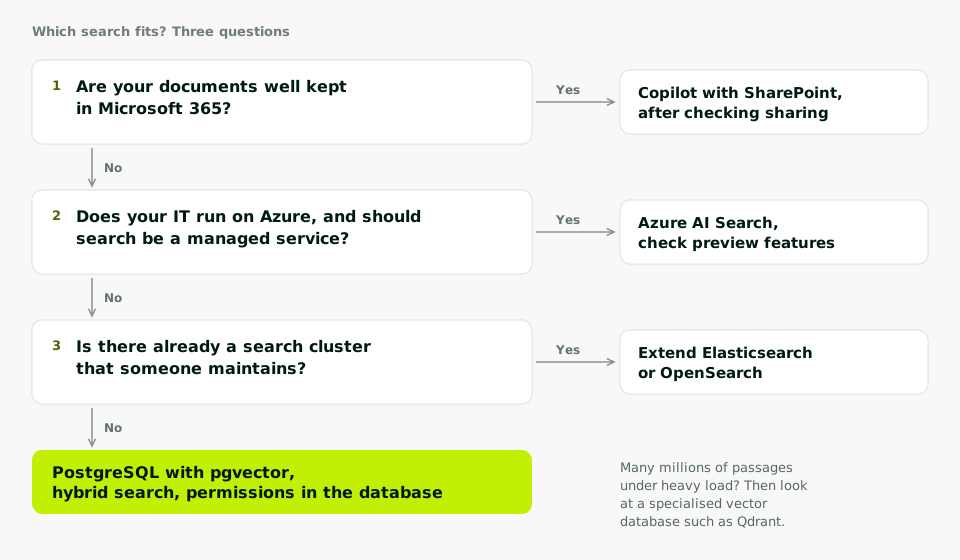
- Are your documents well kept in Microsoft 365? Then try Copilot first, once sharing has been checked. You may not need a project at all.
- Does your IT run on Azure anyway, and should search be a managed service? Then Azure AI Search is the obvious choice. Check beforehand which permission features you need and whether they are still in preview.
- Is there already a search cluster in-house that someone maintains? Then extend it. Otherwise PostgreSQL with pgvector is the simplest route.
Microsoft's own architecture guide points the same way: if you already run a database with vector support and cost matters, use that (Microsoft Learn, vector search in Azure).
Why PostgreSQL with pgvector is our standard
We build knowledge systems on PostgreSQL with pgvector, hosted in Germany. Search runs three ways: by meaning, by exact wording for part numbers and names, and by word stem in German and English. A self-hosted reranker sorts the hits, and every answer cites chapter and page.
The real reason is not speed. It is that text, version and read permission sit in the same database. Someone who may not read a document does not get it as a hit, because the database never hands out the row. With a separate vector database, those permissions would have to be maintained twice and kept in sync.
We also name the limits. At very large volumes, many millions of passages under heavy load, the index needs a lot of memory and a specialised product can be cheaper. And if your data is well kept in Microsoft 365, Copilot often gets you there faster.
Your next step
Write down twenty real searches from your daily work, at least five of them with part numbers, standards or customer names, and note for each the document that should come up. With that list, any of these options can be tested honestly in a few days. How we go about it is on the knowledge systems page. A typical case with part numbers is finding spare parts by photo and serial number.