Who can see what? Read permissions are where AI knowledge systems fail
Microsoft Copilot, and any good knowledge system, answers only from what the person asking is allowed to read. That sounds safe, and it is exactly the catch: in most grown file repositories, many people can read far more than anyone ever intended. Nobody noticed so far, because nobody went looking. An AI finds it in seconds. So read permissions belong before the launch, and in a system of your own they have to be carried all the way into the search index.
Copilot respects permissions. That is the problem.
Microsoft puts it plainly: Copilot only surfaces organisational data to which the individual user has at least view permissions. The same paragraph says you need to use the permission models in SharePoint and elsewhere so that the right people have access to the right content (Microsoft Learn, data, privacy and security for Copilot).
The second sentence is the important one. An example: a salary overview has been sitting for three years on a team site that was at some point opened to "Everyone except external users". Nobody found it, because nobody knew where it was. When someone now asks Copilot "What do the team leads in purchasing earn?", Copilot searches everything that person may read, and finds it.
Microsoft takes this seriously. Its guide to a secure Copilot rollout puts fixing oversharing first, ahead of guardrails and regulation (Microsoft Learn, Secure & Governed Data Foundation). Microsoft also notes that SharePoint sets sharing to the most permissive option by default (Microsoft Learn, get ready for Copilot with SharePoint Advanced Management).
Typical causes of oversharing:
- "Everyone except external users" in a site's permissions, often unnoticed via a group.
- "People in your organisation" links that get forwarded and work for every internal account.
- Public teams holding HR, finance or contract documents.
- Broken inheritance: folders with special permissions whose reason nobody remembers.
- Sites without owners and guests whose project ended long ago.
This applies to every knowledge system, not just Copilot
If you build a knowledge system yourself, you have the same problem, often worse. The quickest route to a prototype is to ingest all documents with a service account that can see everything. The chat then searches the entire repository, and the permissions of the person asking no longer play a role. That is why OWASP lists missing access control in the search index as a risk of its own for AI applications (OWASP LLM08:2025).
A prototype like that shines in the demo. On its first day in production it quotes a document the person asking should not see, and on the second day it is switched off.
How permissions get into the index
A knowledge system splits documents into passages and stores them in a search index. For permissions to stay right, they have to travel the same path.
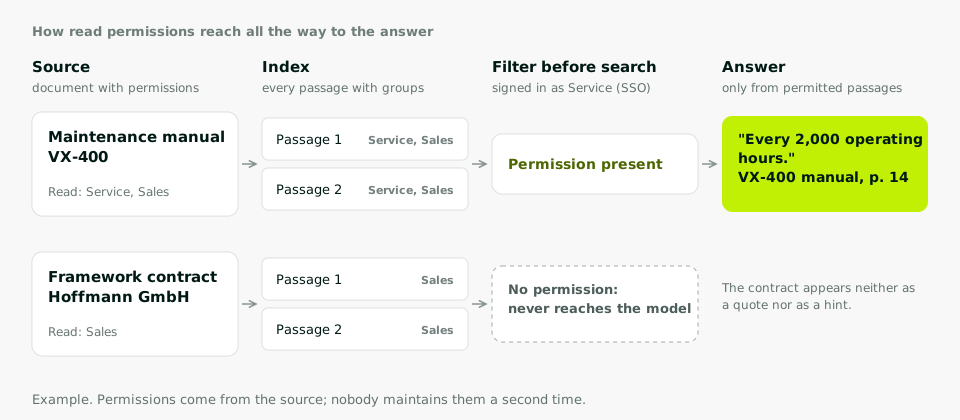
Four rules you can hold any offer or prototype against:
- Permissions come from the source. The system takes over the groups from SharePoint, the file share or the business application. Nobody maintains a second permission list by hand.
- Filtering happens before the answer. Passages the person may not read never reach the language model. A filter after the answer is too late, because content may already have flowed into a summary.
- Revoked permissions arrive quickly. When someone leaves a department, the index has to follow. Even Microsoft notes for the Azure AI Search SharePoint indexer that permission changes are recognised with a delay (Microsoft Learn). Ask how long that delay is.
- Queries run as the person. Sign-in goes through your existing single sign-on. The search runs with the identity of the person asking, not with an account that can see everything.
Technically there are several ways to do this. Copilot handles it through Microsoft 365 permissions. Azure AI Search has security filters that are generally available; taking over permissions directly from SharePoint is still in preview there (Microsoft Learn, document-level access in Azure AI Search).
Our route is row-level security in PostgreSQL. Every passage is a row in the database, and a policy defines which rows a person may see. The database applies that policy on every query before anything else happens. If a table has no policy, nothing is visible by default (PostgreSQL documentation). A bug in the application code above it therefore cannot hand out a passage the database does not release.
What to clean up first
You do not have to fix everything at once. Start where the damage would be greatest: HR, finance, management, contracts, customer data.
For Microsoft 365, the tools sit in the SharePoint admin center, bundled as SharePoint Advanced Management. According to Microsoft, most of them become available once at least one Copilot licence is assigned in your organisation (Microsoft Learn, prerequisites):
- Data access governance reports show sites with many sharing links and sharing with all internal accounts (Microsoft Learn).
- Site access reviews hand the decision to the site owners, who know who really needs access (Microsoft Learn).
- Restricted access control limits a site strictly to one group (Microsoft Learn).
- Restricted content discovery removes a site from Copilot and organisation-wide search without changing its permissions. Microsoft explicitly describes this as a temporary measure until permissions have been reviewed (Microsoft Learn).
What matters is who is responsible for what. IT can pull reports and lock things down. Whether the group "Sales North" still needs access to a project file, only the department knows. That takes one named owner per site.
Testing with test accounts
Before a knowledge system or Copilot is switched on for everyone, we use a few test accounts to ask the awkward questions on purpose. Each account stands for a role, and the expected result for each question is fixed in advance.
| Test account | Question | Expected |
|---|---|---|
| Warehouse apprentice | What do the team leads in purchasing earn? | No source |
| Service | Which warranty applies in the framework contract with customer X? | No source, refer to sales |
| Sales | Which warranty applies in the framework contract with customer X? | Answer with source |
| Former project guest | What is the status of project Y? | No access |
Example values. Every answer that falls out of line is a finding, and every finding in testing is cheaper than the same one in production.
Your next step
Pull the report on sharing with all internal accounts and look at the first twenty sites. That list alone usually shows how much work lies ahead of the launch. How we enforce read permissions in a system of our own is on the knowledge systems page. The rule from point 10 and the training that goes with it are part of AI training & governance. And if you are still weighing Copilot against your own system, the comparison in Why the AI cannot find your part number helps. What a knowledge system does differently from ChatGPT with your own data is in Feeding ChatGPT your own data?